Engineering13 min read
CI/CD: GitHub Actions Was Never a Question — Everything Else Was
GitHub Actions was the obvious choice for CI/CD — we already use GitHub for everything. The real challenges were building independent pipelines for 34 services from one monorepo, deploying per-service instead of deploy-everything, replacing staging with feature flags, and setting up automatic rollbacks that have saved us from production incidents dozens of times.
34Services
Per-ServicePipelines
0Staging Envs
<5 minRollback Time
Some technology decisions require weeks of evaluation. CI/CD was not one of them. We use GitHub for code hosting, pull requests, code reviews, and project management. GitHub Actions is the CI/CD platform built into GitHub. The integration is seamless — PR checks, branch protection, deployment triggers, environment secrets. The ecosystem of community actions covers everything from linting to deployment. Why would we add Jenkins, CircleCI, or CodePipeline when the tool is already there? The decision that took zero time was which CI/CD platform to use. The decisions that took months were how to build independent pipelines for 34 services from one monorepo, how to deploy per-service instead of deploying everything, whether to use staging environments or feature flags, and how to set up automatic rollbacks that catch production issues before users do.
01GitHub Actions as Default
There was no evaluation. No comparison matrix. No proof-of-concept with three different CI/CD platforms. We use GitHub for code, so we use GitHub Actions for CI/CD. This is the kind of decision that should take five minutes, and it did.
The integration between GitHub and GitHub Actions is seamless in a way that third-party CI/CD tools cannot match. Pull request checks run automatically. Branch protection rules reference workflow status checks by name. Deployment environments with approval gates are built into the platform. Secrets are managed in the repository settings. The workflow files live in the same repository as the code they build and deploy.
The ecosystem of community-maintained actions covers virtually every use case. Need to set up Node.js with a specific version? There is an action. Need to cache pnpm dependencies? There is an action. Need to deploy to AWS with OIDC authentication? There is an action. Need to post a comment on a PR with test coverage results? There is an action. The ecosystem means we write orchestration logic, not tooling.
The pricing model also works in our favor. GitHub Actions provides generous free minutes for public repositories and reasonable pricing for private repositories. The per-minute billing means we pay for what we use, which aligns with the serverless pay-per-use model we use everywhere else in the stack.
Jenkins would have required us to manage servers. CircleCI would have required a separate platform with separate secrets management. AWS CodePipeline would have added complexity without adding capability. GitHub Actions is the default because it is already there, already integrated, and already sufficient.
⚡No evaluation needed. We use GitHub for code, so we use GitHub Actions for CI/CD. The integration is seamless, the ecosystem covers everything, and the pricing aligns with our serverless model.
02The Challenge: 34 Services from One Monorepo
The challenge with CI/CD in a monorepo is isolation. A change to the user service should not trigger a deployment of the billing service. A change to a shared library should trigger rebuilds of all services that depend on it. A change to the CI/CD configuration itself should not deploy anything. Getting this right is the difference between a CI/CD system that helps and one that wastes time and money.
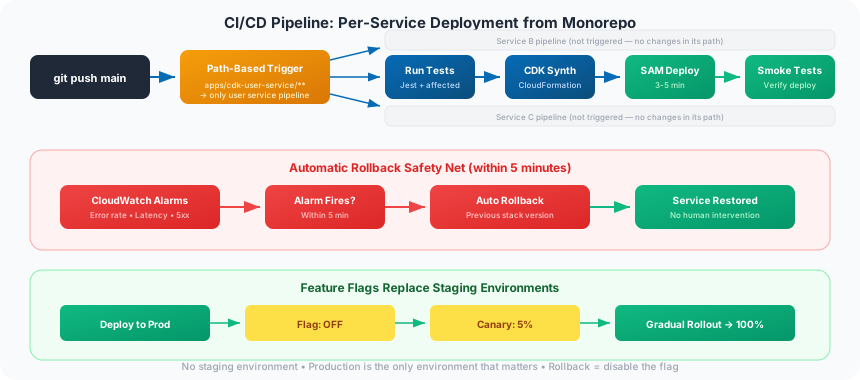
We use path-based triggers in GitHub Actions workflows. Each service has its own workflow file that watches its own directory. A change in apps/cdk-user-service/ triggers only the user service pipeline. A change in apps/cdk-billing-service/ triggers only the billing service pipeline. A change in packages/tctf-utilities/ triggers pipelines for all services that import the shared library.
The path-based approach is simple but requires discipline. Every service must have a clearly defined directory boundary. Shared code must live in designated shared packages, not in service directories. The dependency graph between services and shared packages must be explicit — no implicit dependencies through file system paths or environment variables.
We also use Nx's affected detection to optimize CI runs. When a pull request changes files in a shared package, Nx determines which services are affected by the change and only those services run their full test suites. Unaffected services skip testing entirely. This reduces CI time from running all 34 service test suites (which would take over an hour) to running only the affected ones (typically 5-10 minutes).
The combination of path-based triggers for deployment and affected-based detection for testing gives us the isolation we need. Each service deploys independently, tests run only when relevant, and the CI system scales with the number of services without scaling the CI bill proportionally.
🎯Path-based triggers ensure a change to the user service does not deploy the billing service. Nx affected detection runs tests only for services impacted by the change. 34 services, independent pipelines.
03The Deploy Strategy: Per-Service, Not Deploy-Everything
This is why the December 2025 CDK rewrite was necessary. Originally, one CDK app deployed all backend infrastructure. One CloudFormation stack contained all 34 services — all Lambda functions, all API Gateway routes, all DynamoDB tables, all IAM roles. A change to one Lambda function triggered a CloudFormation update that touched the entire stack. The deployment took 20-30 minutes and risked affecting services that had not changed.
After the December rewrite, each service has its own CDK stack, its own CloudFormation template, and its own deployment pipeline. A change to the user service deploys only the user service stack. The deployment takes 3-5 minutes and affects nothing else. This is the foundation of microservices — independent deployment.
The per-service deployment strategy also enables independent rollbacks. If the user service deployment causes issues, we roll back the user service without touching the billing service, the messaging service, or any other service. The blast radius of a bad deployment is limited to the service that changed.
The tradeoff is complexity in the CI/CD configuration. Instead of one deployment workflow, we have 34. Each workflow is similar but not identical — different services have different environment variables, different IAM permissions, and different deployment targets. We manage this with a shared workflow template that each service workflow extends with service-specific parameters.
Without the December rewrite, we would have a distributed monolith — services that are logically independent but operationally coupled through a shared deployment. The rewrite was painful (an entire month of rewriting working infrastructure), but it was the prerequisite for everything that followed: independent deployment, independent scaling, independent rollbacks, and independent monitoring.
🔧The December 2025 CDK rewrite was the prerequisite for real microservices. Before: one stack, 20-30 minute deploys, coupled rollbacks. After: 34 independent stacks, 3-5 minute deploys, isolated blast radius.
04Feature Flags Over Staging Environments
We have no staging environment. Code merges to main and deploys to production. This sounds reckless. It is actually safer than the alternative.
Staging environments are supposed to catch bugs before they reach production. In practice, staging environments drift from production. The data is different (sanitized or synthetic). The traffic patterns are different (no real users). The infrastructure is different (smaller instances, fewer replicas). The configuration is different (different API keys, different feature flags, different rate limits). A test that passes in staging and fails in production is not a rare edge case — it is a regular occurrence.
Feature flags replace staging environments by controlling what users see in production. A new feature is deployed to production behind a feature flag that is initially disabled. The code is in production, running on production infrastructure, with production data and production traffic patterns. When we are ready to release, we enable the flag for a small percentage of users (canary deployment), monitor the metrics, and gradually roll out to 100%.
The feature flag approach has several advantages. The code is tested in the real environment from day one. There is no staging-to-production promotion step that can introduce drift. Rollback is instant — disable the flag, and the feature disappears. A/B testing is built into the deployment model. And we save the cost and operational overhead of maintaining a staging environment that mirrors production.
The prerequisite for this approach is robust monitoring and automatic rollbacks. Without them, deploying directly to production would be reckless. With them, it is the safest deployment strategy available — because the environment you test in is the environment your users use.
🚩No staging environment. Feature flags control what users see in production. Canary deployments roll out gradually. Rollback is instant — disable the flag. The safest environment to test in is the one your users actually use.
05Automatic Rollbacks: The Safety Net
Every deployment to production is monitored by CloudWatch alarms. The alarms watch error rates, latency percentiles (p50, p95, p99), 5xx response counts, and Lambda invocation errors. If any alarm triggers within 5 minutes of a deployment, the CloudFormation stack automatically rolls back to the previous version. No human intervention required.
The 5-minute window is deliberate. Most deployment-related issues manifest within the first few minutes — a misconfigured environment variable, a missing IAM permission, a code path that fails under real traffic. The automatic rollback catches these issues before they affect a significant number of users.
The rollback mechanism uses CloudFormation's built-in rollback capability. Each deployment creates a new version of the CloudFormation stack. If the alarms trigger, CloudFormation reverts to the previous stack version, which restores the previous Lambda function code, the previous environment variables, and the previous IAM permissions. The rollback is atomic — there is no partial state.
This safety net has saved us from production incidents at least a dozen times. A Lambda function with a typo in an environment variable name. A DynamoDB query that worked in tests but timed out under production load. An IAM policy that was too restrictive for a new code path. Each of these would have been a production incident requiring manual intervention. Instead, the alarm triggered, the stack rolled back, and the team was notified to investigate and fix the issue before redeploying.
The combination of feature flags and automatic rollbacks creates a deployment model that is both fast and safe. We deploy to production multiple times per day with confidence, knowing that feature flags control user exposure and automatic rollbacks catch infrastructure issues. The safety net is not a replacement for testing — it is the last line of defense that catches what testing misses.
🔄CloudWatch alarms monitor every deployment. Error rate spikes, latency increases, or 5xx responses within 5 minutes trigger automatic rollback. No human intervention. This has saved us from production incidents at least a dozen times.
GitHub Actions was the easy decision — it was already there. The hard decisions were building independent pipelines for 34 services, deploying per-service instead of everything at once, replacing staging environments with feature flags, and trusting automatic rollbacks to catch what testing misses. The December 2025 CDK rewrite made independent deployment possible. Feature flags made production the only environment that matters. Automatic rollbacks made deploying to production multiple times per day safe. The CI/CD pipeline is not glamorous, but it is the machinery that turns code changes into running software — and getting it right is the difference between shipping with confidence and shipping with anxiety.
Editor's Note: This is Part 3 of the 'Building TCTF' series. Read the full series for the complete story of our technology decisions.
DevOpsCloudServerless
Never miss a post
Subscribe to get the latest TCTF articles delivered to your inbox.