
Framework Deep DivesFramework Series #17
Account Lifecycle as a State Machine: From Signup to Deletion
Modeling user account states — pending, active, locked, suspended, deactivated, pending deletion — as a finite state machine with event-driven transitions, cooldown timers, grace periods, and audit logging.
6Account States
Event-DrivenTransitions
TTL-BasedLock Cooldown
Temp or PermSuspension
30 DaysDeletion Grace
Every TransitionAudit Trail
A user account is not a static record. It is a living entity that moves through states — created, verified, active, locked after too many failed logins, suspended by an admin for policy violations, deactivated by the user who wants to leave, scheduled for deletion after a grace period, and finally deleted. Each state has different rules: what the user can do, what the system does automatically, and what transitions are allowed. Managing these states with ad-hoc if-else checks scattered across services is a recipe for inconsistency. At TCTF, we model the account lifecycle as a finite state machine — a formal model where every state, every transition, and every side effect is defined explicitly. This article explains how it works.
01Why a State Machine
Without a formal model, account state management becomes a web of conditional logic. Can a suspended user reset their password? Can a locked user update their profile? Can a deactivated user reactivate after the grace period? Each question requires checking the current state, the requested action, and the business rules — and every service that touches user accounts needs to get it right.
A state machine makes this explicit. The states are defined. The transitions are defined. The rules for each transition are defined. A service does not ask can this user do this? — it asks is this transition valid from the current state? The answer is a lookup, not a chain of conditionals.
The state machine also makes the lifecycle auditable. Every transition is logged with the previous state, the new state, the trigger (user action, admin action, system timer), and the timestamp. When a user asks why is my account suspended? the support team can trace the exact sequence of events that led to the suspension.
🔄A state machine replaces ad-hoc conditionals with explicit states and transitions. Every transition is a lookup, not a chain of if-else. Every transition is logged for audit.
02The Six States
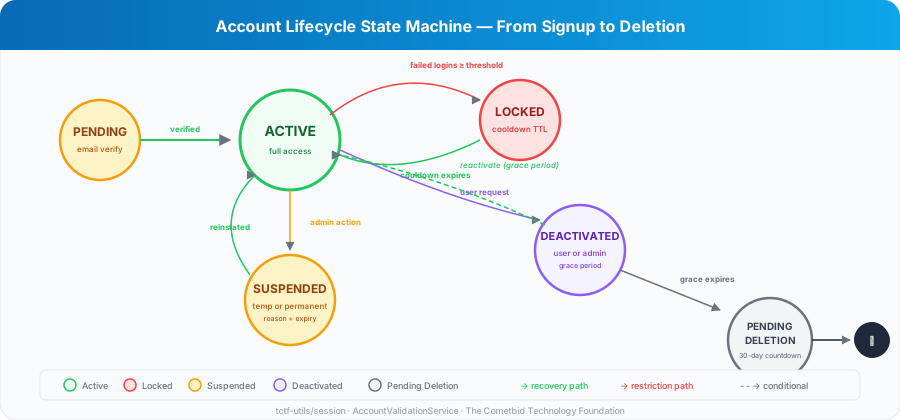
The account lifecycle has six states.
PENDING is the initial state after signup. The user has provided their email and password, but has not verified their email address. In this state, the user cannot log in, cannot access any features, and cannot be found in search. The only valid transition is to ACTIVE (via email verification) or back to nonexistence (if verification expires).
ACTIVE is the normal operating state. The user has full access to the platform based on their role and subscription tier. Most accounts spend most of their time in this state. Transitions out of ACTIVE lead to LOCKED (failed logins), SUSPENDED (admin action), or DEACTIVATED (user request or admin action).
LOCKED is a temporary security state triggered by too many failed login attempts. The user cannot log in until the cooldown period expires. The cooldown is TTL-based — stored in DynamoDB with an expiration timestamp. When the TTL expires, the account automatically transitions back to ACTIVE. No manual intervention needed.
SUSPENDED is an admin-imposed restriction. An admin suspends an account for policy violations, suspicious activity, or pending investigation. Suspensions can be temporary (with an expiry date) or permanent (until manually lifted). The suspension includes a reason that is shown to the user when they try to log in. Transition back to ACTIVE requires admin action.
DEACTIVATED means the account is no longer active — either the user requested deactivation or an admin deactivated it. There is a grace period during which the user can reactivate by logging in. After the grace period, the account transitions to PENDING_DELETION.
PENDING_DELETION is the final countdown. The account is scheduled for permanent deletion after a 30-day retention period. During this period, the user can still contact support to cancel the deletion. After 30 days, all user data is permanently removed — profile, sessions, messages, projects, achievements, and billing history.
📋Six states: Pending → Active → Locked/Suspended/Deactivated → Pending Deletion → Deleted. Each state has clear rules for what the user can do and which transitions are valid.
03The AccountValidationService
The AccountValidationService is the gatekeeper. Every authentication attempt passes through it before the user is granted access. It checks two things: is the account locked, and is the account disabled.
The lockout check queries the session service for the user's login attempt status. If the attempt count exceeds the threshold, the account is locked with a cooldown timer. The cooldown is stored as a TTL in DynamoDB — when it expires, the lock is automatically lifted. The user sees a message telling them when they can try again.
The disability check queries the Cognito user service for the account's suspension details. If the account is disabled, the service determines why — suspended (with reason and optional expiry), deactivated by admin, or deactivated by user request. Each reason produces a different error message so the user knows what happened and what to do.
The service is context-aware. Admin accounts and user accounts have different error messages, different error codes, and different metrics. An admin lockout logs to ADMIN_MFA_FORCE_DISABLE_ERROR. A user lockout logs to ACCOUNT_LOCKED. The same validation logic, different operational context.
Every validation result is tracked by GlobalMonitoring — successful validations, lockouts, and disabled account detections all emit metrics. This feeds into the SLA monitoring dashboards covered in Framework Series #16.
04Lockout: Automatic Protection, Automatic Recovery
Account lockout is the most common state transition after ACTIVE. A user forgets their password and tries several times. A bot attempts credential stuffing. An attacker tries to brute-force an account.
The lockout mechanism uses the session service's attempt tracking. Each failed login increments a counter stored in DynamoDB with a TTL. When the counter exceeds the threshold (configurable per service — typically 5 attempts), the account transitions to LOCKED.
The lock includes a cooldown end time. The user sees: Account is locked due to security policy. Please try again after [datetime]. The cooldown is typically 15-60 minutes, configurable per service.
Recovery is automatic. The DynamoDB TTL expires, the attempt counter is removed, and the next login attempt proceeds normally. No admin intervention, no support ticket, no manual unlock. The user just waits.
For persistent attacks (the same IP trying thousands of accounts), the rate limiting service (Framework Series #4) blocks the IP before the lockout mechanism even triggers. Lockout is the per-account protection. Rate limiting is the per-IP protection. Together, they cover both attack vectors.
🔒Lockout is automatic: TTL-based cooldown, no manual unlock needed. Rate limiting blocks the IP. Lockout protects the account. Together, they cover both attack vectors.
05Suspension: Admin-Controlled Restrictions
Suspension is different from lockout. Lockout is automatic and temporary. Suspension is manual and can be permanent.
An admin suspends an account through the Helpdesk Dashboard. They select the user, choose a suspension type (temporary or permanent), provide a reason, and optionally set an expiry date. The suspension is stored on the user record in Cognito and in DynamoDB.
When a suspended user tries to log in, the AccountValidationService detects the suspension and returns the reason. For temporary suspensions: Account is temporarily suspended until [date]. Reason: [reason]. For permanent suspensions: Account is suspended. Reason: [reason]. Contact support for assistance.
Reinstatement requires admin action. An admin reviews the case, lifts the suspension, and the account transitions back to ACTIVE. The reinstatement is logged in the audit trail with the admin's identity and the reason for reinstatement.
Suspension also triggers notifications — the user receives an email explaining the suspension, the reason, and how to appeal. The email template (account-suspended) is part of the auth template set that shipped in June.
06Deactivation and Deletion: The Exit Path
Users have the right to leave. GDPR requires it. Good platform design respects it.
Deactivation can be user-initiated (I want to leave) or admin-initiated (this account should be removed). Both lead to the same state but with different metadata — the deactivation type (user_requested or admin_initiated) determines the messaging and the reactivation rules.
User-requested deactivation includes a grace period. During the grace period, the user can log back in and reactivate their account. Their data is preserved. Their profile is hidden from search and connections. After the grace period expires, the account transitions to PENDING_DELETION.
PENDING_DELETION starts a 30-day countdown. During this period, the user can contact support to cancel the deletion. After 30 days, a scheduled Lambda function permanently deletes all user data — the Cognito user, the DynamoDB records, the S3 files, the session data, and the activity history. The deletion is irreversible.
The deletion process is thorough. It is not enough to delete the user record — every piece of data associated with the user must be removed. Sessions, messages, project memberships, achievement records, billing history, uploaded files, and cached data. The deletion Lambda queries every table for items with the user's ID and removes them in a transaction.
🗑️ Deactivation → grace period → pending deletion (30 days) → permanent deletion. Every piece of user data is removed: Cognito, DynamoDB, S3, sessions, messages, achievements, billing.
07Audit Trail: Every Transition Logged
Every state transition is logged in the audit trail. The log entry includes the previous state, the new state, the trigger (user action, admin action, system timer, security event), the actor (user ID or admin ID), the timestamp, and any additional context (suspension reason, lockout cooldown, deletion schedule).
The audit trail serves three purposes. First, support — when a user asks why is my account locked? the support team can see the exact sequence of failed login attempts that triggered the lockout. Second, compliance — GDPR and other regulations require that account actions are traceable. Third, security — the audit trail detects patterns that individual events do not reveal, like an admin suspending accounts without proper justification.
Audit entries are stored in DynamoDB with the user's ID as the partition key and the timestamp as the sort key. This means querying a user's complete account history is a single partition key query — fast and efficient.
The audit trail integrates with GlobalMonitoring. Every state transition emits a metric — account_locked, account_suspended, account_deactivated, account_deletion_scheduled. These metrics feed into dashboards that show account health across the platform — how many accounts are locked, how many are suspended, how many are pending deletion.
An account lifecycle is not a feature — it is a responsibility. Users trust the platform with their identity, their data, and their professional reputation. The state machine ensures that trust is handled correctly at every stage — from the moment they sign up to the moment they choose to leave. Every state has clear rules. Every transition is validated. Every action is logged. And when a user decides to delete their account, every piece of their data is removed completely. That is what it means to take account lifecycle seriously.
Editor's Note: This is Framework Series #17 in the TCTF Newsletter. Next in the series: Security Utilities — sanitization, token management, and API key validation.
Never miss an edition
Subscribe to get TCTF newsletters delivered to your inbox.



Browse by Month
2026
August
July
June
- Caching Strategies for Serverless, Part 2: ElastiCache Redis for Low-Latency Session and API Caching
- Caching Strategies for Serverless: From In-Memory to DynamoDB-Backed TTL Caches
- Rate Limiting at Serverless Scale: Tiered Throttling with DynamoDB
- TCTF's DynamoDB Framework, Part 2: Building a Fluent Query Builder in TypeScript
May
April
March
February