TechnicalTech Series #3
How We Built a Real-Time Messaging System with AWS Lambda and WebSockets
Inside the architecture of TCTF's messaging platform — three services handling real-time chat, campaign delivery, and transactional notifications, all built on Lambda, API Gateway WebSockets, SQS, and multi-provider email with automatic failover.
3Messaging Services
3Email Providers
5Channels
AutomaticFailover
SQS-basedCampaign Delivery
WebSocketReal-Time
Messaging is the backbone of any platform. Users need to receive verification emails when they sign up, password reset links when they forget their credentials, campaign newsletters when there is news to share, and real-time chat messages when they are collaborating on a project. At TCTF, messaging is not one service — it is three, each handling a different aspect of the communication layer. This article explains how we built the messaging architecture: the real-time WebSocket path for instant chat, the SQS-based campaign delivery pipeline for bulk sends, and the multi-provider email system that fails over automatically when a provider goes down.
01Three Services, Three Responsibilities
The messaging layer is split into three independent services, each with its own deployment pipeline, its own DynamoDB tables, and its own scaling characteristics.
cdk-messaging-consumers is the campaign and notification engine. It handles bulk email campaigns (newsletters, holiday greetings, product updates), subscriber management, template rendering, and failed message tracking. This was the first service to ship — v1.0.0 in April 2026.
cdk-communication-service handles transactional notifications — the messages that are triggered by user actions. Verification emails when you sign up. Password reset links. MFA codes. Account locked notifications. These are time-sensitive, one-to-one messages that must be delivered reliably. This service deploys in June alongside the authentication stack.
cdk-user-message-service handles real-time user-to-user messaging — chat conversations, WebSocket connections, read receipts, rich media, and message search. This is the most complex of the three and deploys in August.
The separation matters because each service has different scaling needs. Campaign delivery is bursty — a newsletter to 10,000 subscribers generates 10,000 SQS messages in seconds. Transactional notifications are steady — a few hundred per hour during normal usage. Real-time chat is connection-heavy — thousands of persistent WebSocket connections with low-latency message routing.
📨Three services: campaigns (bulk), communication (transactional), user messaging (real-time). Each scales independently. Each deploys independently. Each has its own failure domain.
02Real-Time Chat: WebSockets on API Gateway
Real-time messaging uses API Gateway WebSocket APIs. When a user opens Cometbid Social, the frontend establishes a WebSocket connection. API Gateway assigns a connectionId and invokes a Lambda function for each connection event.
The connection lifecycle has three routes: $connect (user opens the app — store the connection in DynamoDB), $default (user sends a message — route it to the recipient), and $disconnect (user closes the app — remove the connection from DynamoDB).
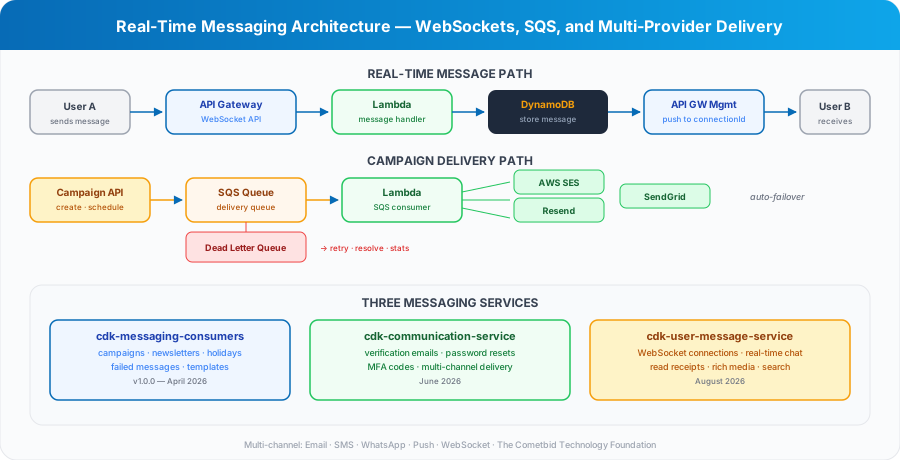
When User A sends a message to User B, the flow is: the message arrives via WebSocket, Lambda stores it in DynamoDB, Lambda looks up User B's active connections via a GSI (USER#{userId} → CONNECTION#{connectionId}), and Lambda uses the API Gateway Management API to push the message to each of User B's active connections.
If User B is offline (no active connections), the message is stored in DynamoDB and delivered when User B reconnects. The frontend queries for unread messages on connection and displays them in the conversation.
Connections have a 24-hour TTL in DynamoDB. If a disconnect event is missed (browser crash, network drop), the stale connection is cleaned up automatically. When a push to a stale connection fails, the Lambda function deletes it immediately.
🔌WebSocket connections stored in DynamoDB with GSI for user-to-connection lookup. Messages pushed via API Gateway Management API. Offline messages stored and delivered on reconnect.
03Campaign Delivery: SQS-Based Pipeline
Campaign delivery is fundamentally different from real-time chat. A campaign sends the same message (with personalized variables) to thousands or tens of thousands of recipients. The delivery must be reliable, throttled to respect provider rate limits, and observable.
The pipeline starts with the Campaign API. An admin creates a campaign, selects the audience, chooses a template, and schedules the send. At the scheduled time, the scheduler Lambda generates one SQS message per recipient and pushes them to the delivery queue.
The SQS consumer Lambda processes messages in batches. For each message, it renders the template with the recipient's personalized data (name, preferences, unsubscribe link), selects the email provider, and sends. The consumer respects provider rate limits by controlling the batch size and concurrency.
Failed messages go to a Dead Letter Queue (DLQ). A separate Lambda monitors the DLQ and provides three operations: retry (re-queue the message for another delivery attempt), resolve (mark the message as permanently failed), and stats (aggregate failure reasons for monitoring).
The campaign API also supports pause, resume, and cancel operations. Pausing a campaign stops the scheduler from generating new SQS messages. Resuming picks up where it left off. Canceling removes pending messages from the queue.
04Multi-Provider Email: Automatic Failover
TCTF does not depend on a single email provider. The email delivery layer supports three providers: AWS SES (primary), Resend (secondary), and SendGrid (tertiary). Each provider is wrapped in a circuit breaker.
When the primary provider (SES) fails — rate limiting, service outage, delivery errors — the circuit breaker opens and the system automatically routes to the secondary provider (Resend). If Resend also fails, it falls over to SendGrid. When the primary provider recovers, the circuit breaker closes and traffic returns to SES.
This failover is transparent to the caller. The campaign delivery Lambda calls sendEmail() and the provider selection happens internally. The caller does not know or care which provider delivered the message.
Each provider has its own configuration: API keys stored in AWS Secrets Manager, rate limits, retry policies, and circuit breaker thresholds. SES has generous rate limits (hundreds per second) but requires domain verification. Resend has simpler setup but lower rate limits. SendGrid is the fallback with the most generous free tier.
The multi-provider approach means a single provider outage does not stop email delivery. In the v1.0.0 load test, we simulated SES failures and confirmed that failover to Resend happened within seconds, with zero dropped messages.
🛡️ Three email providers with automatic failover: SES → Resend → SendGrid. Each wrapped in a circuit breaker. A single provider outage does not stop delivery. Zero dropped messages in load testing.
05Multi-Channel Delivery
Email is the primary channel, but not the only one. The messaging architecture supports five delivery channels: Email, SMS, WhatsApp, Push notifications, and WebSocket.
The channel selection is per-notification-type. Verification emails go via Email. MFA codes can go via Email or SMS (user preference). Campaign newsletters go via Email. Real-time chat goes via WebSocket. Push notifications go to mobile devices via Firebase Cloud Messaging (when the mobile app launches in November).
The communication service abstracts the channel selection. A service that needs to send a notification calls the communication API with the notification type and the recipient. The communication service looks up the recipient's channel preferences, selects the appropriate channel, and delivers. The calling service does not know which channel was used.
This abstraction means adding a new channel (WhatsApp Business API, for example) is a change in the communication service — not in every service that sends notifications. The notification types, the templates, and the calling code remain unchanged.
06Template System and Personalization
Every message — whether a campaign email, a transactional notification, or a system alert — is rendered from a template. The template system uses Handlebars for variable substitution and supports both SES-hosted templates and DynamoDB-stored templates.
SES templates are deployed as part of the CDK stack. They are used for high-volume campaigns where SES handles the rendering server-side via SendTemplatedEmailCommand. This offloads template rendering from Lambda and reduces execution time.
DynamoDB templates are stored in the configuration table and rendered at runtime with Handlebars via SendEmailCommand. They are used for templates that change frequently or need complex conditional logic that SES templates do not support.
The template registry maps notification types to template names. When a service needs to send a WELCOME_EMAIL, it looks up the template name in the registry, fetches the template, renders it with the recipient's data, and sends. The registry also includes validation rules — ensuring that required template variables are present before rendering.
At v1.0.0, the platform shipped with 27 admin templates following the design system: 700px flat layout, circular unDraw illustrations, VML CTA buttons for Outlook compatibility, and a dark footer with social icons. By launch in October, the template count will reach 116.
07What Comes Next
The messaging architecture shipped in v1.0.0 covers campaigns, newsletters, failed message handling, and the template system. The next phases add the remaining pieces.
June brings the communication service — transactional notifications that support the authentication flow (verification emails, password resets, MFA codes). This is the service that makes signup and signin work end-to-end.
August brings the user message service — real-time chat with WebSocket connections, read receipts, rich media (file attachments, image previews), scheduled messages, conversation search, and message pinning. This is the service that makes Cometbid Social a communication platform, not just a social feed.
The three services together form a complete messaging layer: bulk campaigns for marketing, transactional notifications for system events, and real-time chat for user communication. All built on serverless infrastructure, all independently deployable, all sharing the same multi-provider email backbone.
🚀April: campaigns and templates. June: transactional notifications. August: real-time chat. Three services, three deployment windows, one complete messaging layer.
Building a messaging system on serverless is not about choosing between WebSockets and SQS. It is about using both — WebSockets for the real-time path where latency matters, SQS for the bulk path where reliability matters. The three-service architecture gives each concern its own scaling profile, its own failure domain, and its own deployment timeline. And the multi-provider email backbone ensures that no single provider outage stops the platform from communicating with its users. That resilience is what makes messaging infrastructure trustworthy.
Editor's Note: This is Tech Series #3 in the TCTF Newsletter. The messaging architecture was the first system to ship in v1.0.0 (April 2026). Next in the series: the Voice Assistant architecture (January 2027).
Never miss an edition
Subscribe to get TCTF newsletters delivered to your inbox.

Browse by Month
2026
August
July
June
- Caching Strategies for Serverless, Part 2: ElastiCache Redis for Low-Latency Session and API Caching
- Caching Strategies for Serverless: From In-Memory to DynamoDB-Backed TTL Caches
- Rate Limiting at Serverless Scale: Tiered Throttling with DynamoDB
- TCTF's DynamoDB Framework, Part 2: Building a Fluent Query Builder in TypeScript
May
April
March
February