Framework Deep DivesFramework Series #19
The Activity Publisher: Event-Driven Notifications Across 34 Services
How we built a unified activity publishing system — any service emits events through a shared publisher, SNS fans out to subscribers, and the activity service handles routing, deduplication, and delivery across 30+ activity types.
30+Activity Types
6Phases
Shared UtilityPublisher
SNSFan-Out
Built-inDeduplication
Multi-ChannelDelivery
When a user likes a post, the post author should see a notification. When a project milestone is approved, the contributor should get an email. When someone connects with you, you should see it in your activity feed. These notifications come from different services — the social network service, the project management service, the user management service — but they all need to reach the same place: the user's notification feed, their email inbox, or their mobile push notifications. The challenge is connecting 25 producer services to the notification delivery pipeline without coupling them together. The solution is the Activity Publisher — a shared utility in tctf-utils that lets any service emit activity events through a standard interface, with SNS handling the fan-out to subscribers.
01The Problem: Every Service Needs to Notify
Without a shared publisher, every service that needs to send a notification would implement its own notification logic. The social network service would call the email API directly when someone gets a new follower. The billing service would call the push notification API when a payment is received. The project service would call the WebSocket API when a milestone is approved.
This creates tight coupling. Every producer service depends on every delivery channel. When you add a new channel (push notifications for the mobile app), every producer service needs to be updated. When you change the email provider, every service that sends emails needs to be redeployed.
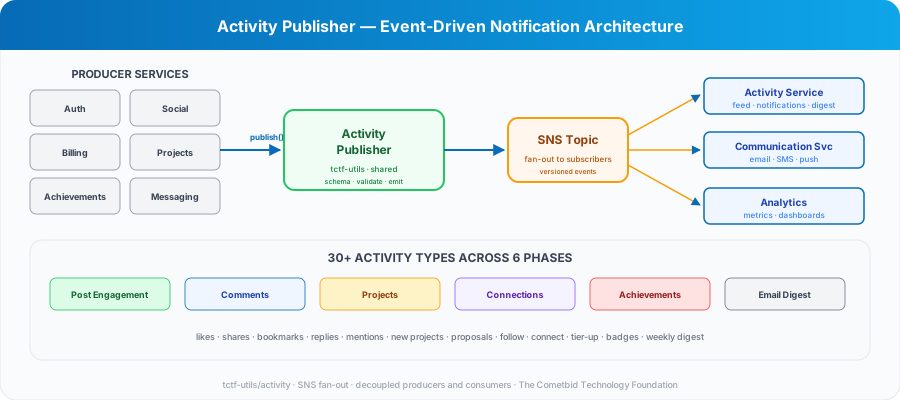
The Activity Publisher decouples producers from consumers. A service that wants to notify a user calls publisher.publish(event) — a single function call with a standard event schema. The publisher sends the event to an SNS topic. The activity service, the communication service, and any future subscriber receive the event independently. The producer does not know or care how the notification is delivered.
🔌Producers call publisher.publish(event). SNS fans out to subscribers. The producer does not know how the notification is delivered. Adding a new channel means adding a subscriber, not modifying producers.
02The Event Schema: Versioned, Typed, Validated
Every activity event follows a standard schema. The schema includes the event type (new_follower, post_liked, milestone_approved, payment_received), the actor (who triggered the event), the target (who should be notified), the object (what the event is about — a post, a project, a payment), the timestamp, and a version number.
The version number is critical. When the schema evolves — a new field is added, a field is renamed, a field's type changes — the version increments. Consumers check the version and handle unknown versions gracefully. This prevents a schema change in one service from breaking downstream consumers.
The publisher validates the event against the schema before publishing. Missing required fields, wrong types, and invalid values are caught at the producer — not at the consumer where the error is harder to trace. Validation errors throw immediately with clear messages so the developer knows what to fix.
The event types are organized into six phases: post engagement (likes, shares, bookmarks, reactions), comment engagement (replies, mentions, threads), project activity (new projects, proposals, milestone updates), connection events (follow, connect, accept, block), achievement milestones (tier promotions, badges earned, leaderboard changes), and email integration (digest summaries, critical alerts).
📐Every event has a type, actor, target, object, timestamp, and version. The publisher validates before publishing. Consumers handle unknown versions gracefully. Schema evolution never breaks downstream.
03SNS Fan-Out: One Event, Many Subscribers
The Activity Publisher sends events to an SNS topic. SNS handles the fan-out — delivering the event to every subscriber simultaneously. This is the key architectural decision that enables decoupling.
The activity service subscribes to the topic and handles the user-facing notification feed. It stores the event in DynamoDB, updates the user's unread count, and pushes a real-time notification via WebSocket if the user is online.
The communication service subscribes to the same topic and handles email delivery. Not every event triggers an email — the service checks the user's notification preferences (covered in Framework Series #15) and only sends emails for events the user has opted into. Critical events (payment received, account locked) always send emails regardless of preferences.
Future subscribers can be added without modifying any producer. When the analytics service needs to track engagement patterns, it subscribes to the topic. When the AI recommendation engine needs to learn from user behavior, it subscribes. Each new subscriber is an independent deployment — no changes to the publisher, no changes to existing subscribers.
SNS guarantees at-least-once delivery. This means a subscriber might receive the same event twice. The activity service handles this with deduplication — each event has a unique ID, and duplicate events are detected and discarded before they reach the user's feed.
04Deduplication and Aggregation
At-least-once delivery means duplicates are possible. But even without duplicates, some events should be aggregated rather than shown individually.
If 50 people like your post in an hour, you should not see 50 separate notifications. You should see one: 50 people liked your post. The activity service aggregates events by type and object — multiple likes on the same post are collapsed into a single notification with a count.
Deduplication uses the event's unique ID. When an event arrives, the service checks if an event with the same ID has already been processed. If it has, the duplicate is discarded. The deduplication window is configurable — typically 24 hours, long enough to catch retries but short enough to keep the deduplication store manageable.
Aggregation uses a time window and grouping key. Events with the same type and object within a 15-minute window are grouped. The first event creates the notification. Subsequent events increment the count. After the window closes, a new group starts. This gives users timely notifications without overwhelming them during high-activity periods.
📊50 likes on your post = 1 notification with a count, not 50 separate notifications. Deduplication by event ID. Aggregation by type + object within a 15-minute window.
05User Preferences and Delivery Channels
Not every user wants every notification. The notification preferences system (covered in Framework Series #15) lets users control what they receive and how.
Channel preferences determine the delivery method: in-app feed (always on), email (configurable frequency: immediate, daily digest, weekly digest), push notifications (on/off per type), and SMS (critical alerts only).
Event type preferences determine which events generate notifications: post engagement (on/off), comment mentions (on/off), connection requests (on/off), project updates (on/off), achievement milestones (on/off). Each type can be configured independently per channel.
Quiet hours prevent notifications during specified time periods — configured per user with timezone support. A user in Lagos can set quiet hours from 10 PM to 7 AM WAT, and no push notifications or emails will be sent during that window. In-app feed notifications are still stored but not pushed.
The communication service checks all of these preferences before delivering a notification. The activity service stores the event in the feed regardless of preferences — the user can always see their full activity history in the app, even if they opted out of email notifications for that type.
06The Weekly Digest
Not everyone checks the platform daily. The weekly digest email summarizes the past week's activity in a single email — new followers, post engagement, project updates, achievement progress, and upcoming milestones.
The digest is generated by a scheduled Lambda function that runs every Monday morning. It queries each user's activity feed for the past 7 days, groups events by category, and renders the digest email template with the aggregated data.
The digest respects user preferences. Users who prefer immediate email notifications do not receive the digest (they already got individual emails). Users who prefer weekly digest frequency receive only the digest, not individual emails. Users who opted out of email entirely receive neither.
The digest template is one of the 116+ email templates in the platform — following the same design system with the 700px layout, circular illustrations, and VML buttons for Outlook. It includes a personalized summary, top highlights, and a call-to-action to visit the platform.
07How Services Use the Publisher
Using the Activity Publisher is straightforward. A service imports the publisher, constructs an event, and calls publish.
The social network service publishes when a user likes a post, follows someone, comments on a post, or shares content. The event includes the actor (who did it), the target (who should be notified), and the object (the post, the comment, the profile).
The billing service publishes when a payment is received, an escrow is funded, a milestone is released, or a subscription renews. The event includes the financial details needed for the notification — amount, currency, milestone name — without exposing sensitive billing data.
The achievement service publishes when a user earns a badge, advances a tier, or reaches a leaderboard milestone. The event includes the achievement details and the user's new tier.
The project service publishes when a proposal is submitted, a task is assigned, a milestone is due, or a team member is invited. The event includes the project context so the notification can link directly to the relevant project page.
In every case, the service calls one function — publisher.publish(event) — and the notification pipeline handles the rest. The service does not know about email templates, push notification tokens, WebSocket connections, or user preferences. It just publishes the fact that something happened.
✅One function call: publisher.publish(event). The service publishes the fact. The pipeline handles the delivery. No coupling to email, push, WebSocket, or user preferences.
The Activity Publisher is the connective tissue between services and users. It turns internal events — a database write, a state change, a business action — into user-facing notifications that arrive in the right channel, at the right time, with the right level of detail. And it does this without any service knowing how notifications are delivered. That decoupling is what makes the notification system extensible — adding a new channel, a new event type, or a new subscriber is a change in one place, not in 25 services.
Editor's Note: This is Framework Series #19 in the TCTF Newsletter. Next in the series: Structured Logging with AWS Powertools — correlation IDs, metrics, and tracing (January 2027).
Never miss an edition
Subscribe to get TCTF newsletters delivered to your inbox.

Browse by Month
2026
August
July
June
- Caching Strategies for Serverless, Part 2: ElastiCache Redis for Low-Latency Session and API Caching
- Caching Strategies for Serverless: From In-Memory to DynamoDB-Backed TTL Caches
- Rate Limiting at Serverless Scale: Tiered Throttling with DynamoDB
- TCTF's DynamoDB Framework, Part 2: Building a Fluent Query Builder in TypeScript
May
April
March
February